
Get paid directly. We never take a cut.
NextiaInvoices tracks what you are owed and makes paying you easy, but the money goes straight from your client to you. Use it free or pay a flat subscription for the software — never a percentage of what you bill.
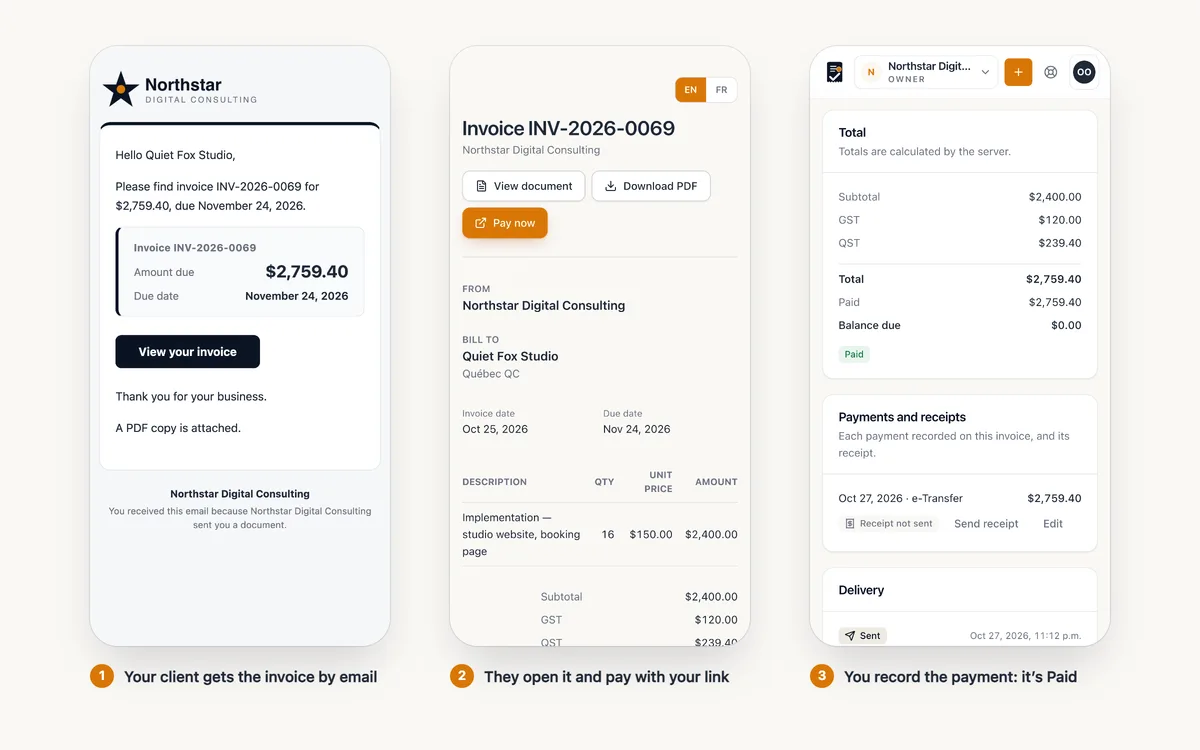
Three steps, and we are absent from the important one.
- 01
Add your payment link and instructions
A Stripe or Square payment link, a PayPal page, or any HTTPS address — plus written instructions for e-transfer or cheque. Set a business default, or a different link for a particular service.
- 02
It appears on every invoice
As a Pay now button in the secure client view and on the PDF. The invoice email links your client straight to that view.
- 03
You record the payment
When the money lands, record it — in full or in part — and the balance, the dashboard and the client’s statement update. Send a receipt in one click.
What NextiaInvoices does not do.
We are invoicing software, not a payment processor. That keeps your money, and your merchant relationship, yours.
For a payment link, all NextiaInvoices stores is the public URL you chose.
- Take a percentage of what you invoice
- Hold or receive your funds
- Store your clients’ card numbers
- Act as merchant of record
- Ask for your bank password
Works with the link you already have.
Because a payment link is just a URL, anything that can produce one works today. Switching providers later means editing one field.
- Stripe Payment Link
- Square Payment link
- PayPal Invoice or payment link
- Helcim Payment page
- Wise Payment request
- Interac e-Transfer Bank instructions
- Bank transfer Written instructions
- Any HTTPS URL Your provider, your choice
Provider names are trademarks of their owners. Nextia is not affiliated with or endorsed by them.
Online payments through your own provider account.
Connect your own Stripe, Square or PayPal account and let clients pay an invoice by card straight from the email or the client view, with the payment recorded against the invoice automatically. The money still goes to your account, under your provider’s terms.
Not available at launch. Until it is, use a payment link and record payments as they arrive. Card details will go to your provider, never to Nextia.
Different work, different links.
A retainer paid by card and a project paid by bank transfer should not share a button. When you issue an invoice, its payment link is chosen in a fixed order:
-
1 · Service link
A link attached to the service being billed wins.
-
2 · Business default
Otherwise, the default you set for the business.
-
3 · No button
And if neither is set, the invoice carries no payment button. Nothing is invented.
The chosen link is saved on the invoice when you issue it, so an old invoice keeps pointing where it did — even after you change providers.
A URL is untrusted input, and we treat it as one.
HTTPS required
Payment links must be HTTPS. Unsafe schemes such as javascript: and data: are rejected.
Shown, not hidden
The destination is displayed to your client. A payment button should never be a mystery redirect.
Injection-protected
Links and instructions are escaped everywhere they are rendered — email, client view and PDF.
Changes are logged
Changing a payment link writes an audit entry: who changed it, and when.
Questions about getting paid
Does NextiaInvoices process payments?
No. It records payments and makes paying you easy, but money goes directly from your client to you. Add your own payment link — a Stripe or Square payment link, a PayPal page or any HTTPS address — plus e-transfer or cheque instructions, and it appears as a Pay now button on your invoices.
Can clients pay by card inside NextiaInvoices?
Coming soon. Connecting your own Stripe, Square or PayPal account so clients can pay an invoice online is not available at launch. Until then, use a payment link and record payments as they arrive. Card details will go to your provider, never to Nextia.
What percentage do you take of my invoices?
Zero. No percentage, no per-transaction fee — on Free or on a paid plan, which is a flat subscription. Your payment provider charges its own fees, as it does today.
How do invoices get marked as paid?
You record the payment — in full or in part, by e-transfer, cheque, card, cash or other — and the balance is tracked. You can also take deposits and send receipts.
Can different services use different payment links?
Yes. Set a business default and, optionally, a different link on a service. The link is saved on each invoice when it is issued.
Your first invoice in under five minutes, from opening day.
Set up your business, add a service, and bill a client — all before your coffee gets cold.
Free plan, forever · 14-day Pro trial, no credit card · Nothing locked or deleted when it ends